
Spectrum Lab - Preface and Help Index
Contents / Overview
Program Version: Spectrum Lab V2.96 or later
Revision Date  : 2021-05-14 or later (YYYY-MM-DD)
Version history: See revision.txt .
Author         : Wolfgang "Wolf" Buescher (DL4YHF)
Website        : Moved to http://www.qsl.net/dl4yhf/spectra1.html.
Author's email : On the author's website ("subject to change" / "robots keep off" !)
Short Description
Spectrum Laboratory (short: SpecLab) is a program to...
- analyze the spectrum of an audio signal via the PC's soundcard
- analyze the spectrum of a previously recorded sound in a wave-file
- observe how the spectrum changes over the time by a "waterfall" display
- perform n-th order audio filtering in real-time, output sent to the soundcard again
- generate and decode some 'special' digital radio amateur communication modes
- plot data which have been calculated by signal analysis functions
- Send and receive audio streams, possibly with timestamps from a GPS receiver, over the internet .
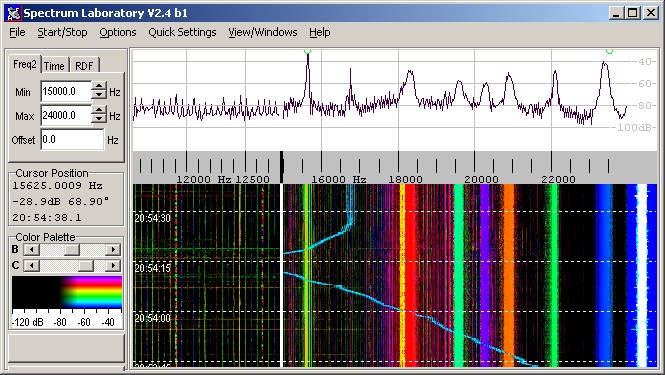
The main window will often look like this.. there is a control bar at the left side, a spectrum graph in the upper part, and/or a spectrogram (aka 'waterfall') in the lower part. The screenshot shows a few VLF transmitters on a spectrogram in Radio-Direction-Finder mode.
Spectrum Lab is intended mainly to be used for amateur radio experiments,
but you may also try it for something completely different as long as you
keep in mind that this program is still far from being "professional" software
! Because this program is freeware, the entire risk of its use is with you.
Translations of the manual into other languages
Because of a lack of time, there is no translation of this manual into German and other languages.
Aus Zeitmangel gibt's leider noch immer keine deutsche Übersetzung dieses
Handbuchs (die würde dem englischen "Original" eh ständig nachhinken),
nur eine Kurzanleitung in deutscher Sprache.
Verwenden Sie notfalls die am Ende dieses Dokumentes verlinkte automatische
Übersetzung (funktioniert leider nur online, per Google Translate).
Un lien vers une traduction française se trouve à la fin de ce document.
Features
Just an overview and a lot of links to places in the manual. Maybe you'll find here what you are looking for... if not, use the "backward"-button of your browser. Unfortunately, after conversion from HTML to PDF (using a "master document" in LibreOffice), none of the links from one former HTML file to another file works (only links within a file to a named anchor were still functional in the PDF).
- A to Z (Keyword Index)
-
System Requirements, installation, program start;
Soundcard Selection and Audio Settings, drivers for special input hardware,
Winrad-compatible ExtIO DLLs. - Main Window, Main Menu, Quick Settings, User-defined menu .
- Spectrum display (combineable with the 'waterfall'), controls, frequency scale, frequency markers, frequency list .
-
Components :
Circuit window, with preprocessor, filters, DSP blackboxes, Frequency calibrator, and more.
Don't miss the FFT-based filter with frequency shift and USB/LSB conversion - Setup Dialog (Configuration, Audio settings, FFT settings, Display settings, and other options)
- Colour Palette Editor
- Colour Direction Finder (a waterfall-based radio direction finder)
- Screen capture, Periodic and Scheduled Actions
- Wave file logging and analysis, triggered audio recorder
- Data File export functions
- Watch window and Plotter
- Phase- and Amplitude Monitors
- Time Domain Scope (usable as oscilloscope and phase meter)
- User-defineable menus
- Digital Audio Filter (also usable as multi-notch, limiter, denoiser)
- Test Signal Generator
- Digimode Terminal
- Time Signal Decoder, GPS (NMEA) Decoder, DGPS Decoder .
- Interpreter : -commands, -functions, -expressions
-
Communication between SpectrumLab and other
programs,
using the integrated HTTP server or simple WM_COPYDATA messages. - Sending and receiving audio streams over the internet
- Connecting a GPS receiver to the soundcard to improve timestamp accuracy
- Getting started with QRSS (very slow Morse code viewer)
- Troubleshooting
- Applications and links:
Beacon logging, VLF
Receiver, Natural Radio,
EVE
,
Image-cancelling direct conversion receivers (with I/Q processing),
DTMF-controlled multi-frequency 'VHF bat monitor' - "scroll back in time" while the program continues receiving
- optional Radio-Direction-Finder mode where the colour (hue) value shows the direction of the transmitter(s) and the intensity (brightness) shows the fieldstrength
- frequency scale adjustable ("Min" and "max") while reception continues
- old part of the waterfall display will automatically be re-drawn if settings are changed
- waterfall display may run from top to bottom, or from right to left (good for HELL modes)
- frequency scale may be mirrored for "Lower Side Band" receivers
- switch between display modes without stopping to record data, so you won't miss anything of the input signal
- FFT input size may be switched between 256 and 65536 samples per FFT without stopping the analysis and without deleting the previously recorded part of the waterfall
- audio sample rate may be selected between 8000 and 44100..48000 samples per second with a 16-bit-resolution giving about 90dB of input range. If you have a fast PC and an appropriate soundcard, you may even try 96000 samples per second. Note: The Soundblaster Extigy is a nice card, but it's A/D converter does *NOT* sample at 96 kHz ! Some more expensive cards (M-audio) even run at 192 kSamples/second these days.
- FFT output may be scaled "linear" or "logarithmic" (in decibels)
- buffer for the FFT results with adjustable size for "long-term" beacon observations (along with the "scroll-back" slider)
- waveform monitor in a separate "scope" window
- multi-tone and noise test signal generator with AM and FM
- time-signal decoder and digi-mode decoder (under construction)
- programmable audio filter (N-th order FIR- or IIR-filter, or FFT-based filter with autonotch)
- I/Q processing for image-cancelling direct conversion receivers and exciters, usable for Software Defined Radio experiments
- periodic and scheduled actions (like screen capture) for long-term observation
- automatic, versatile Spectrum-ALERT function (not maintained but still works)
- versatile text-file-based export functions for post processing of 'calculated' data (trends, field strength plots, etc)
- triggered audio recorder with pre-and post-trigger option
- Communication with other applications through a simple message-based system
- Audio streams, MP3, etc may be fed into this program through a Winamp plugin (see SpecLab website)
- Runs under Linux, too (using WINE, on a moderately fast PC with Gnome or KDE destktop)
Applications
Very Low Frequency Receiver (local link)
Started as an experiment to receive historic transmissions from Grimeton
radio (SAQ) in the longwave spectrum. The program runs as a software receiver.
Almost no external hardware required. An antenna is connected directly to
the soundcard's input. The input from the soundcard is converted into the
audible spectrum (about 650 Hz), passed through a narrow-band audio filter
and fed to the soundcard's output.
Natural Radio Receiver (local link)
Describes how to use Spectrum Lab to improve the quality of your natural
radio reception *by software*. Uses Paul Nicholson's multi-stage comb filter
to remove AC hum and harmonics in the audio spectrum. You can add up to 32
other independent notches to remove other unwanted signals, like 70 Hz from
PC monitors, or add lowpass / highpass filtering if needed.
I/Q Processing (local link)
I/Q processing is one of the keys to software-defined radio (SDR). Though
SL wasn't designed as easy-to-use interface for an SDR, it can be
used as such: Not only as a broadband waterfall display (with quadrature
inputs), but also as modulator + demodulator + test signal generator with
I/Q in- and/or outputs.
There are a few preconfigured setting for some popular radios in SL's 'Quick Settings' menu.
In addition, there are some configuration files for Spectrum Lab to be used with receivers delivering I/Q output. For example,
"stereo4mf.usr" is a configuration which allows listening to two independent signals, on two different frequencies, with stereo headphones.
A list with a short description of the configuration file distributed along with Spectrum Lab is here.
Many of them are designed for receivers with I/Q output.
A LowFER Receiver Using a "Software" IF (web link, added here 2006-04)
This article by Lyle Koehler, KØLR, describes a "software defined" receiver, and some other (easier-to-use) alternatives to SpecLab too. Don't miss Lyle's simple downconversion circuits which he sucessfully uses to the receive US-American LowFER beacons. The last part describes how to log fieldstrengths of LowFER beacons with Spectrum Lab's plot window.
Automated LF monitoring facitily (web link; unfortunately broken..)
Created and operated by Brian, CT1DRP (a radio amateur from Portugal operating on longwave). This systems continously records signals on the 136kHz band, analyzes and logs some parameters using the file export function. The resulting graphs are frequently updated.
Measuring the signal strength of low-duty-cycle beacons (local link)
Used for propagation studies on shortwave. Radio amateurs all over the world operate becons on certain frequencies (like 14.1 MHz). These beacons periodically transmit a carrier and their identifier in Morse code. Some of these beacons have a very low duty cycle but a precise interval, for example 1 second carrier and 3 minute interval. This application takes precise readings of the signal strength, and writes the result into a text file which can be post-processed with a spreadsheet program etc.
The Eart-Venus-Earth experiment was a successfull attempt by Amsat-DL to receive own 2.4 GHz echos from Venus. This required incoherent averaging (because of the spectral broadening of the microwave signal). Details can be found on the AMSAT-DL website, and in the AMSAT-DL Journal #2 / June 2009 .
About the help system
The complete help system was originally written in HTML. Spectrum Lab tries to open the pages and jump to a named location (called an "anchor" in html) when a help button is clicked. This used to work perfectly well until the advent of internet explorer 7 !
In IE6, it was possible to open an html document, with the anchor appended after the '#'-character. For example:
iexplore c:\Spectrum\html\index.htm#about_help
opened this document in the internet explorer, and jumped directly to the anchor "about_help". No idea why this doesn't work with IE7 - it simply ignores the "anchor name" passed in the command line.
To circumvent this problem, Spectrum Lab now looks for FIREFOX, and maybe other browsers known to work 'better'. If any of these internet browsers is installed, it will be launched to show the requested help page (and jump to the named anchor in the URI, which worked perfectly with these browsers when tested with the up-to-date versions of OPERA and FIREFOX in April 2007).
Only if none of the 'good' browsers can be found, the help system will use the default browser (which, under windows, will usually be IE, which caused the problems mentioned above).
Keyword index ("from A to Z")
Due to the large size of the main pages, the keyword index has been moved into an extra file ("a_to_z.htm").Help system / "manual" as a single PDF ?
The HTML pages are occasionally combined into a single PDF, which may be easier to read, and much better to print .. if you really need it on paper. The manual is contained in the installer (subdirectory 'doc'). It may also be available online at www.qsl.net/dl4yhf/speclab/SpecLab_Manual.pdf. Unfortunately most of the links (between different HTML documents) don't work after being converted into a PDF (using LibreOffice), thus in most cases the original HTML files are easier to use.
Disclaimer and legal stuff
This software is provided 'AS IS' and any express or implied warranties, including, but not limited to, the implied warranties of merchantability(*), fitness for a particular purpose, or non-infringement, are disclaimed. In no event shall the author or contributors be liable for any direct, indirect, incidental, special, exemplary, or consequential damages (including, but not limited to, procurement for the substitute of good or services, loss of use, data, or profits; or business interruption) however caused and on any theory of liability, whether in contract, strict liability, or tort (including negligence or otherwise) arising in any way out of the use of this software, even if advised of the possibility of such damage.
- (*) to be more specific, this software isn't merchantable at all, since I will not sell it, and no-one else is allowed to... ;-)
In other words, the entire risk is with you ! (what else would you expect from a freeware..)
Namings for products, that are registered trademarks, are not separately marked in these documents. The same applies to copyrighted material. Therefore the missing (tm), ®(r), or ©(c) does not implicate, that the naming is a free trade name. Furthermore the used names do not indicate patent rights or anything similar.
Ogg Vorbis disclaimer and terms of use
The Ogg Vorbis audio format, as implemented in Spectrum Lab, is based on
'libogg' and 'libvorbis', Copyright (c) 2002-2008 Xiph.org Foundation.
Conditions and terms of use, copied from the Vorbis library, follows further
below. For details, please visit
http://xiph.org/vorbis/. You will find
the sourcecode, the file format specification, and the documentation of this
beautiful open, patent-and-royalty free, compressed audio format there.
 Redistribution and use in source and binary forms, with or without
modification, are permitted provided that the following conditions are
met:
- Redistributions of source code must retain the above copyright notice, this list of conditions and the following disclaimer.
- Redistributions in binary form must reproduce the above copyright notice, this list of conditions and the following disclaimer in the documentation and/or other materials provided with the distribution.
- Neither the name of the Xiph.org Foundation nor the names of its contributors may be used to endorse or promote products derived from this software without specific prior written permission.
THIS SOFTWARE IS PROVIDED BY THE COPYRIGHT HOLDERS AND CONTRIBUTORS ``AS IS'' AND ANY EXPRESS OR IMPLIED WARRANTIES, INCLUDING, BUT NOT LIMITED TO, THE IMPLIED WARRANTIES OF MERCHANTABILITY AND FITNESS FOR A PARTICULAR PURPOSE ARE DISCLAIMED. IN NO EVENT SHALL THE FOUNDATION OR CONTRIBUTORS BE LIABLE FOR ANY DIRECT, INDIRECT, INCIDENTAL, SPECIAL, EXEMPLARY, OR CONSEQUENTIAL DAMAGES (INCLUDING, BUT NOT LIMITED TO, PROCUREMENT OF SUBSTITUTE GOODS OR SERVICES; LOSS OF USE, DATA, OR PROFITS; OR BUSINESS INTERRUPTION) HOWEVER CAUSED AND ON ANY THEORY OF LIABILITY, WHETHER IN CONTRACT, STRICT LIABILITY, OR TORT (INCLUDING NEGLIGENCE OR OTHERWISE) ARISING IN ANY WAY OUT OF THE USE OF THIS SOFTWARE, EVEN IF ADVISED OF THE POSSIBILITY OF SUCH DAMAGE. (end of the Ogg / Vorbis disclaimer and terms of use)
Acknowledgements (more in the "ABOUT"-box)...
Ogg Vorbis file format supported by virtue of
xiph.org, using their open source
libraries.
ASIO support was added using the ASIO SDK by Steinberg .
JPEG support was added using the JPEG library (c) 1994-1997, Thomas G. Lane.
The Multi Stage Hum Filter is based on sources by Paul Nicholson .
The Colour Direction Finder is based on a work by Markus Vester .
Other contributions were made by members of the RSGB LF Group .
Early soundcard routines were inspired by the WinPSK31 sources by Moe Wheatley
and Dave Knight .
Support for PERSEUS was added using a Software Development Kit (SDR-DK)
"Copyright Microtelecom s.r.l. – Pavia di Udine, Italy".
Support for SDR-IQ / SDR-14 is based on sample code provided by RFSpace and
MoeTronix .
Last modified : 2021-05-14
Benötigen Sie eine deutsche Übersetzung ? Vielleicht hilft dieser Übersetzer - auch wenn das Resultat z.T. recht "drollig" ausfällt !
Avez-vous besoin d'une traduction en français ? Peut-être que ce traducteur vous aidera !