Linrad, MAP65 and Perseus - howto (If you cannot read this text, press HERE to download the PDF)
The Perseus SDR doesn’t need any introduction. It’s well known in the radio world already due to its great performance.
This SDR runs with a lot of third party software and a useful tool for EME is MAP65, software of the K1JT family.
MAP65 and the Perseus doesn’t run without the Linrad engine. Again beautiful software made by Leif SM5BSZ. The config of Perseus and Linrad and MAP65 is sometime a bit confused so here are some hints to get it done.
1. Download the latest version of Linrad. In September 2012, it was version 03.43
2. Download the latest version of MAP65. At this moment this is V 2.3.0 r2471
3. Install MAP65.
4. Unpack Linrad.
5. Config MAP65 with F2 as
6. Config Linrad with N(etwork) setup as Don’t forget to save with W !
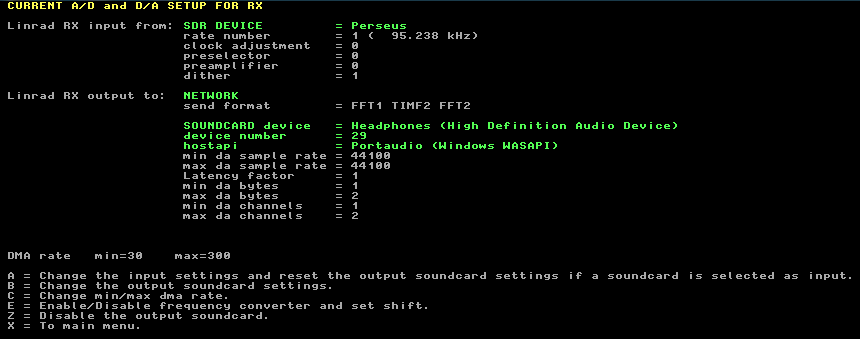
7. Config Linrad with U as: The soundcard output can be different. This depends on your local device. Very important is the rate number of the Perseus. This must be 95.238 kHz !! The same as the input in MAP65.
8. Enable network send in the main screen with T. The screen should look like this: Very important is the netsend enable: red in the upper left corner.
9. Push D for normal SSB operation and click on the upper waterfall. Linrad will now start working.
10. Start MAP65 and you will see data on the screen. Below 20mtr JT65A on 14076 kHz.