Radio Programming

This page will help you with the programming with analog and digital radios. This page is only a guide, all radios are made differently and you should consult your manual with detailed instructions.

The first half of the page will deal with analog radio and the second half will deal with digital (DMR) radio. Each radio can be programmed keyboard direct (enter programming information from keyboard) or you can use what is called a Customer Programming Software, most commonly known as CPS.Most DMR radios can be used in cross mode. Many hams have their CPS's on their main computer (in their shack) and on a laptop or tablet so they can quickly program it (the radio) in the field.
I recommend keeping a CPS on a shack PC and also a laptop and / or tablet for field operations.

Most radios now can be programmed by blue tooth by simply getting a dongle to plug into your radio like you do with the programming cable, and connect that with your PC or phone.
Using the phone in the field is the newest way so you don't have to carry around a laptop.


One of the main CPS for analog radio is a program called CHIRP. It will work with a number of radios, you can see if your radio is compatible with CHIRP here.Some radios use a different driver then your radio. You might see use XXXX, where XXXX is the other driver.

Chirp can be used on a Windows, Mac OS or a Linux system.

You can get CHIRP by getting the CHIRP-next or the CHIRP-legacy version.

To download CHIRP, select your system by choosing the correct icon. PLEASE NOTE: The download may not be the current download, but you be prompted to upgrade when starting CHIRP.

Windows Logo MacOS Logo Linux Logo

Get It!

Not all radios are compatible with CHIRP and sometimes you will need to use a different driver withing CHIRP for your radio due to that at the time CHIRP doesn't have a driver for your radio.
at times, if CHIRP does not have a driver, you will need to use the driver or look for the driver for your radio, usually on the manufacturers website.

Here is a screen shot of CHIRP:

CHIRP Screenshot
While using CHIRP, you can program your radio in one of two ways:

You can select the repeaters from: Radio > Query Source > RepeaterBook inside CHIRP and let CHIRP enter the required information needed.
You can also enter the information, which is the frequency, PL tone and offset yourself.

You should let the software put in all the required information. This will prevent any mistypes that will prevent you from accessing a repeater.

If you are putting in a simplex frequency, you do not need a DCS / CTCSS or PL tone and offset. The only time you may want to use a DCS or CTCSS tone is to silence your radios so you don't hear other chatter on the frequency you are using.

Sites you may use to get frequencies are:
                                            1. RepeaterBook
                                            2. RadioReference
                                            3. DMR-MARC
I can't guarantee that any or all will work in your area, but querying from RepeaterBook is your best bet. CHIRP is usually updated each day. When you start CHIRP, it will tell you if there is a update, and if so, it will ask you if you want to update. This is totally up to you to update at this time, but I do recommend you to update CHIRP at every now and then due to new drivers and radios being added.

It is always a good practice before you program your radio is to upload the radio to your computer and save that file so you can use it to reset your radio in case your radio stops working.

This next section is going to talk about programming your analog radio for SIMPLEX and REPEATER use. Simplex means just that, you use one frequency for your TX and RX. Just think of it as a party line, if I had a party line or extension telephone, and picked it up while others where talking, I could hear what is being said. A repeater works in much the same way, but you need to do a little more work to access the repeater. A repeater uses what is called a PL tone also called CTCSS or DCS tones.
A repeater normally uses two frequencies, one you TRANSMIT to the repeater with, and another that the repeater transmits on and you LISTEN to the repeater to.
Below I will show what you might see on repeaterbook.com. You results will differ from mine since I used my area.


Below is the first screen is where you select the country you want to search.
This is where you select the country for which you want to search for repeaters from.

Choose Country Image

This is the next image you see after selecting the country, (This image will vary depending on the country you selected. This is the image for the US.).
Here is where you select the state where you want to search for repeaters.You may be directed to the second image automatically.
If you do not see this, and want to search different countries, you may goto here.


Choose A State Image


Here is where you will select the band / mode for which you want to search. This shows all the bands, modes, linked and emergency repeaters that may be in the area. Also on this page, if you scroll down, you can see any repeaters that may be around highways in that state.
Also, you can search for repeaters by directly clicking on a city / town name or the county.


This next page shows all the frequencies for the band / mode you selected. It will also tell you if the repeater is OPEN or CLOSED, the mode(s) the repeater is capable of  and the status of the repeater.

Repeater Information Image

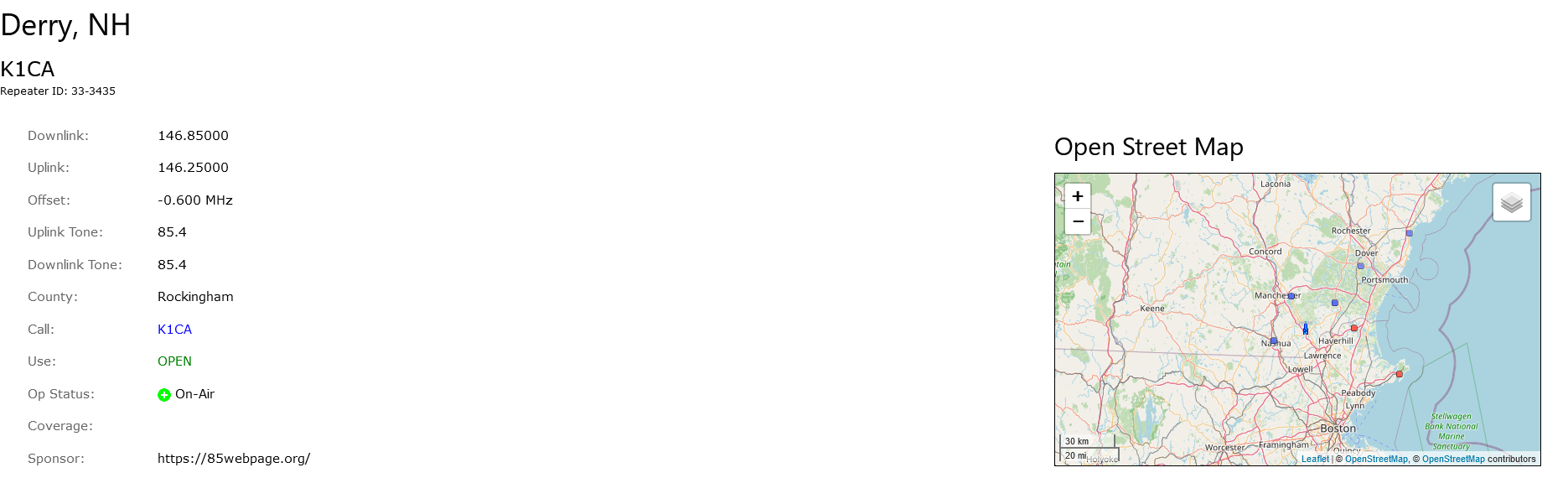
After you select a frequency (which is clickable), then you get the repeater information which includes the downlink, uplink frequencies, tone(s) (CTCSS or DCS), city, county, call sign of repeater and other info for the repeater.

Repeater Info Page


CTCSS Tone Chart DCS Tone Chart

The CTCSS and DCS tones have two functions, They are:
                                      1. wake up" the repeater and lets you transmit into it,
                                      2. And acts as a privacy code so you don't get any unwanted transmissions.
There is another radio service called GMRS (General Mobile Radio Service) that use the same methods as amateur radio. You can also find GMRS repeaters on RepeaterBook and on MyGMRS.com.
You will program your radio as if programming a ham radio.


You will use CTCSS or DCS tones for analog radios only. Digital radios use what is called Color Codes, (numbered from 0 - 15). Color Codes are basically the same as CTCSS or DCS. Most radios let you enter a CTCSS or DCS directly, but you may have to enter the number.

Before you do anything in the digital world, you will need to get a DMR ID. This DMR ID can be use for all you DMR radios or if you want, you can get multiple ones for each radio.
Also, if you bought a radio off someone else, or are selling a radio, make sure theirs / your DMR ID is not on the radio. ALWAYS use your DMR ID.

Get A DMR ID


United States Call Sign Look Up  New Hampshire Call Sign Look Up  My QRZ Page
My QRZCQ Page My HamCall Page  Back To Start Page

RADIO
HOME ABOUT CONTACT WEATHER
RADIO PROGRAMMING APRS BASICS PI-STAR BASICS DOWNLOADS
DMR AND NETS HAM TOOLS LEARN HAM RADIO