|
|
|
|
|
|
|
A file in a computer system is like a file folder in a filing cabinet. It is a collection of information that has a name associated with it. You usually choose the name for the file when you create it with the editor. From that point on, you refer to the file by the name you've given it. |
|
|
|
|
|
|
|
|
There are so many different types of editors, each with different features, that we can't begin to describe them all here. But we can describe some of their general characteristics. (Again, consult the manual for your computer to learn the details of the editor you'll be using.) |
|
|
|
|
|
|
|
|
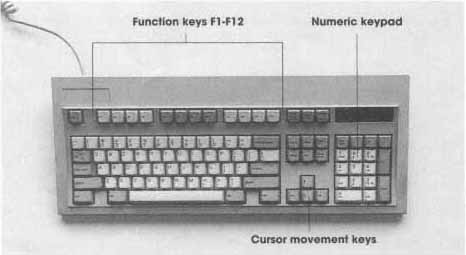
The basic unit of information in an editor is a display screen full of characters. The editor lets you change anything that you see on the screen. Most computer keyboards have a special group of keys called cursor keys. (The cursor is the mark on the screen that indicates the point where you are typing.) The cursor keys are a set of arrows that point up, down, right, and left (see Figure 2-4). Each time you press one of them, the cursor moves one line up or down, or one character right or left. You can use these keys to move the cursor to any point on the screen. The keyboard also may contain command keys that let you look at other parts of the file, delete characters or lines, insert new lines, and so on. |
|
|
|
|
|
|
|
|
When you create a new file, the editor clears the screen to show you that the file is empty. Then you enter your program, using the cursor and command keys to go back and make corrections as necessary. Figure 2-5 shows an example of an editor's display screen. |
|
|
|
|
|
|
|
|
Compiling and Running a Program |
|
|
|
|
|
|
|
|
Once your program is stored in a file, you compile it by issuing a command to run the C++ compiler. The compiler translates the program, then stores the machine language version into a file. On some systems, the compiler also creates and stores a listing into another file. A listing is a copy of the |
|
|
|
|
|
|
|
|
Figure 2-4
Computer Keyboard |
|
|
|
|
|