THE RULES
There aren't many rules to remember, but none-the-less they are still very important.
Each and every drop repeater has two DTMF codes; an on code and an off code. By entering the on code, you link the associated drop repeater to the SARA backbone. The off code will disconnect the associated drop repeater from the SARA backbone.
Lets say from Edmonton we want to call a station in Brooks.
Step One:
Access the local drop repeater VE6NHB 145.410 (-600). Make sure no one is on the repeater. Then you must connect the repeater to the "party line" or the system. As mentioned before, most of the repeaters on the SARA system are normally left in the OFF position. To connect or bring VE6NHB on-line give the repeater call followed by your call sign and punch in the DTMF code 654*. VE6NHB... VE6SRV 654*. You should hear a voice reply alerting you to the fact the repeater is now enabled. If nothing is heard, try again. Not all DTMF pads on amateur radios are created equal.
Step Two:
Now listen to make sure no one else is on the system. Now we want to enable our destination repeater in Brooks. That repeater is VE6EID. So following the same procedure that we used to bring VE6NHB on-line we now will turn on VE6EID. Once again, first give the repeater call sign, then yours and the DTMF code 612*. VE6EID... VE6SRV 612*. Again, you should hear a voice response. If not, try again. Most of the repeaters on the SARA system use voice responses, some however, use a CW response.
Step Three:
We are there. You have connected Edmonton to Brooks. It's that simple! Again, listen to make sure no one is using the VE6EID repeater. If not simply call your station or give a general CQ. Follow normal operating procedure. Give your intended station's call followed by yours. VE6XYZ...VE6SRV. Carry on your QSO, then reverse the procedure to take the repeaters off line, but this time we use the down codes. These codes are the second set of numbers in the directory listing. Lets go through the procedure.
Step Four:
Once you have finished using the destination repeater we ask you take the system down. This can be done by either station. Sometimes, it is safer if you are mobile to let the station on base or portable take the system down.
First, give the call of the destination repeater, then your call and ( still using Brooks as our example) the DTMF code 613*. VE6EID...VE6SRV 613*. The voice or CW identifier will tell you the repeater is off-line.
Step Five:
Once you have heard the destination repeater go off line then repeat the procedure for the local repeater. Again, give the repeater call sign followed by yours and (still using VE6NHB as our example) the DTMF code 655*. VE6NHB...VE6SRV 655*. You will hear the repeater go off line.
Congratulations, you have just mastered the SARA system!
NEIGHBORING SYSTEMS
THREE HILLS LINK
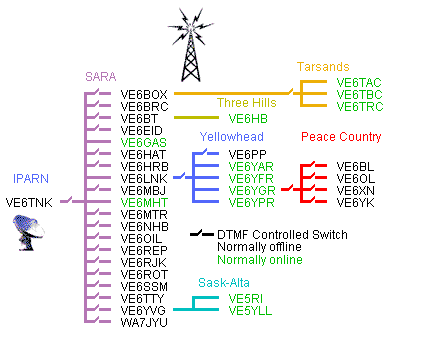
The Three Hills Amateur Radio Club maintain a link system between VE6BT at Wimborne and VE6HB at Delia. Access to VE6HB is gained when VE6BT is linked into the SARA system.
TARSANDS LINK
The Tarsands Amateur Radio System, covers the northeastern part of Alberta, including repeaters in May Hills and two in Fort McMurray. SARA is connected to the Tarsands network through an interconnect switch at Athabasca. To access repeaters on the Tarsands system, you just add one extra step. Lets call it step 1A. Bring up your local repeater using step one of the above instructions. Bring up the interconnect by giving the interconnect call (VE6TBC) then yours and the DTMF code 682* (683* off). VE6TBC...VE6SRV 682*. A voice will let you know you have connected. Then simply follow the instructions in step 2 to complete the process. The repeaters on the Tarsands network are always on the network and do not require drop codes to access.
SASK-ALTA LINK
The Sask-Alta Amateur Radio Club maintain the VE5RI repeater located south of Lloydminster, which gives long range coverage of the area. This repeater is linked into VE5YLL which gives handheld coverage in Lloydminster due to its downtown location. Once the VE6YVG repeater and link radios at Vermillion are installed, these repeaters will become accessible to the SARA system.
YELLOWHEAD NETWORK
The Yellowhead Amateur Radio System, covers the north-western part of Alberta, including repeaters in Grande Cache, Jasper, Hinton, and Whitecourt. SARA is connected to the Yellowhead network through an interconnect switch at Buck Mountain. To access repeaters on the Yellowhead system, you just add one extra step. Lets call it step 1A. Bring up your local repeater using step one of the above instructions. Bring up the interconnect by giving the interconnect call (VE6LNK) then yours and the DTMF code 600* (601* off). VE6LNK...VE6SRV 600*. A voice will let you know you have connected. Then simply follow the instructions in step 2 to complete the process. A special note, the codes listed for VE6YGR have been reconfigured to control the interconnect to the Peace Country linking system. There are no codes to control the VHF drop repeater in Grande Cache.
PEACE COUNTRY NETWORK
The Peace Country linking network is accessible via the Yellowhead system. Repeaters located in Grimshaw, Saddle Hills, and Grande Prairie, are accessed through this system. The switch to link the Peace Country to the Yellowhead system is located at VE6YGR (628*/629*). To link from SARA to the Peace Country, both VE6YGR and VE6LNK switches must be enabled. To link from SARA to the Peace Country, add step 1B. VE6YGR...VE6SRV 628*. In this case you will hear a CW identifier come back. You can now access any repeater on the Peace Country network. Three more repeaters, VE6BL in Beaverlodge, VE6EVE in Hines Creek, and VE6YK in Valleyview, are to be linked into the Peace Country network in the future.
IRLP ( The Internet Radio Linking Project )
IRLP allows users to link repeaters via a internet connection.
There are two connection modes for an IRLP connection -- Direct one-to-one,
and one-to-many via a Reflector
DUE to the business of some reflectors, SARA
restricts ACCESS TO REFLECTORS.
Node
Status Page
MAKING A DIRECT CONNECTION
Identify with your callsign and the fact
that you are controlling, and then enter the ON code for the node
you wish to link with. The system should
come up with a carrier as it waits for the connection to be
established. You may hear a few seconds
of dead air, so don't be concerned. When the connection is
confirmed, the voice ID of the destination node
will be transmitted back to you. As well, the other node
will hear your node’s voice ID on their repeater.
After hearing the confirming voice ID, wait at least 15
seconds before transmitting to make sure that
you don’t interfere with an ongoing conversation.
Due to the audio delays inherent in a linked
system, as well as those added by the Internet connection,
it’s important that you adhere to the following
practice. Wait for a couple of seconds after pressing the
PTT button before you begin to speak. This
allows time for all of the links to get established and ensures
that your first few words won’t be cut off.
Some nodes are configured so that you cannot
connect with them if their repeater is in use. In this
case, you will hear the message, "The node you
are calling is being used locally". If you hear this
message, wait 5 or 10 minutes and then try again.
You may also be informed that the other node
is currently linked either to another node or to a
reflector. If they’re linked to another
node, you will have to try again later. If they’re linked to a
reflector, you can link to the same reflector
and call them there.
Should you stay connected to a node and there
is no activity for 4 minutes, the connection may time out
and automatically disconnect. This
is dependent on the other node’s time out value; our time out value is
significantly higher.
When dropping the link, announce your call
and your intent, and then enter the OFF code. You should
hear a confirming voice ID that the link has been
dropped. If not heard, try entering the OFF code again.
Back to the SARA Homepage