BEACON TRANSMITTER KEYED BY A SMARTPHONE
(2016)
KLIK HIER VOOR DE NEDERLANDSE VERSIE

The beacon transmitter is keyed by the audio output of a smartphone.
Experiments with very low power QRSS beacon transmitters
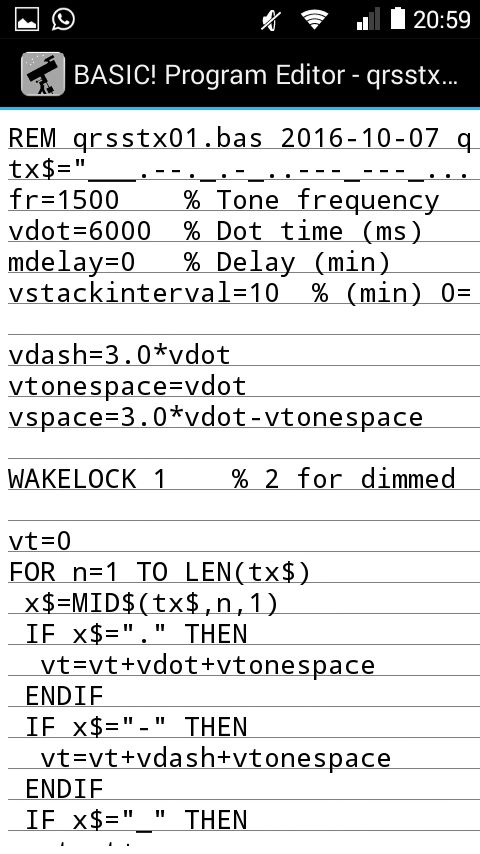
There is a group enthusiastic radio amateurs that is doing experiments with very low powers. That is possible by using a low CW speed (QRSS speed). Most of the activities can be found in a band of only 200 Hz, namely 10139.9 to 10140.1 kHz in the 30 meters amateur band. But nowadays, the transmissions are time synchronized. The transmissions start on multiples of 10 minutes. The reception is also started on multiples of 10 minutes. The advantage is that it is possible to stack received signals, a kind of addition of a number of received signals. And so the weak signal are better readable. This time synchronized transmission was not possible with the audio player, but it is with a smartphone! And because everyone always wants to have the latest smartphone, there are plenty of old smartphones available! A simple program was written in the free programming language RFO basic, as with RFO basic you can generate tones and thus make Morse code! Below is a screenshot of the smartphone in action.

Screenshot of the smartphone with the simple RFO basic program.
Hobby for lazy people?
Is it a boring hobby? Your smartphone keys your beacon transmitter and you do not have to do anything! Enjoy a relaxing weekend on bare feet, snow cleaning, to plant a tree or to read your favorite radio magazine in the garden and at the same time you are still busy with radio! You do not need your shoes and socks, unfortunately you have to stay at home, as it is not allowed that your beacon transmitter operates unmanned! Therefore, such a beacon transmitter is also known as a MEPT, a Manned Experimental Propagataion Transmitter. Perhaps that you can say that the whole world is your home, but I do not know if that is acceptable for the authorities.
What this hobby makes so interesting is of course where your weak signal will be received. Normal radio amateurs mention the standard 100 watt power already "Barefoot" power, because they think that it is the minimum usable power. But a MEPT is only 0.5 watts which is 200x lower. And I used only 10 milliwatts, so 10000x lower than the standard "Barefoot" power. Still nice that the 10mW can be received troughout whole Europe. Even a 1 mW signal can still be received at many places!
And technically seen it is also a very interesting activity! It has to be possible to adjust the exact frequency of your MEPT with an accuracy of better than 5 Hz. For stacking, the drift should be less than 1 Hz per hour. And the transmissions have to be time synchronized. To make a reception station is also very challenging. But it can all be realized with simple, inexpensive means. It is indeed a very nice, cheap and little time consuming hobby!

Your smartphone keys your beacon transmitter and you do not have to do anything!
RFO basic
You can use RFO basic to create simple programs. RFO BASIC! is a dialect of DARTMOUTH BASIC that allows you to write and run programs directly on your Android device. And ... it's free! And easy! You can download it at the following website:
http://rfo-basic.com/
You can download and install the app here. But it is also possible to do that via the standard AppStore on your smartphone. You can also find here the documentation and manual. Nowadays we want to have a result as quickly as possible. But it's better and nicer to spend a few evenings to read the manual and to see what possibilities there are and to play a little with the sample programs that are included in the software.
The menu of the developement environment of RFO basic and the program to key the beacon transmitter.
The menu is simple and a further explanation is not necessary. Apart from the normal basic functions, there are also many for the features of your smartphone. You can read the GPS data, read SMS messages, activate the buzzer or take a picture with the camera. For example, you can create a program that makes a photo every hour and uploads it together with your position to an FTP site.
Download the RFO basic program by clicking the link here below:
Besides the "qrsstx01.bas", the ZIP file also contains some other programs, the result of playing a few days with RFO basic.
Connect your smartphone to the USB port of your PC and upload the "qrsstx01.bas" to the directory "H:\RFO-basic\source". RUN RFO basic and select the program with the menu option "Load". Now you have to change a few lines of code:
The variable "tx$" has to be changed to your call sign in Morse code. An underscore is a pause between two letters.
The variable "fr" is the audio frequency and does not need to be changed.
The variable "vdot" is the time duration of a dot in milliseconds.
The variable "mdelay" is a delay and you can set it to 1 or 2 if you do not want to start exactly on multiples of 10 minutes but 1 or 2 minutes later.
And the variable "vstackinterval" is 10 for the standard synchronized transmissions on multiples of 10 minutes. You can also change it to 20 minutes or 30 minutes. When you set the value to zero, the transmission is not time synchronized.
Save the program and select the menu option "Run" to start the program.
Connect the headphone output to the beacon transmitter and set the volume to maximum. As the output only has to give voltage and no power, this will not cause any problems.
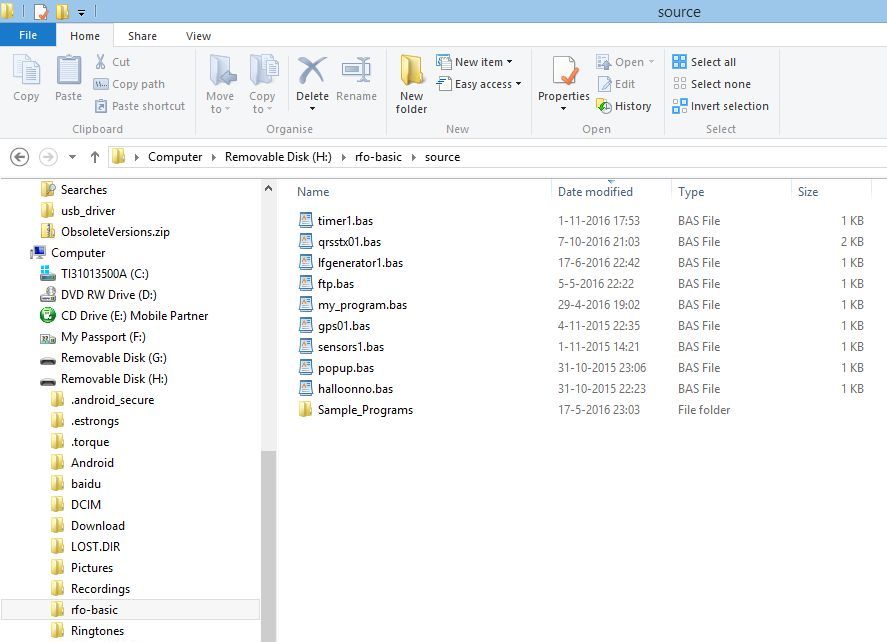
Connect your smartphone to the USB port of your PC, the program can be found in the directory here above.
In the directory Sample_Programs you can find all kinds of interesting example programs.

And this is how the signal looks when it is received.
Now let's look at how you could make the hardware. There are of course other possibilities, this is my MEPT of only 10 mW.
Description of the circuit diagram of the transmitter
A crystal oscillator with a BC547 transistor is buffered by NAND1 and NAND2 and amplified by NAND5 to 8. The circuit with NAND3 and NAND4 is a square wave oscillator. When the switch is opened, the transmitter is frequency modulated by this square wave. But also in amplitude. During the positive half of the square wave, NAND5 to 8 are all switched on and the transmit power is 10 mW. During the negative half of the square wave, only NAND8 is active and the transmit power is only 1 mW (or 0.1 mW, depending on the used resistor values). When the switch is closed the transmitter is keyed by the audio signal of the smartphone. The left BC547 does amplify this signal, the right BC547 with diode 1N4148 is the detector that makes zeroes and ones out of it. The capacitor of 10 uF does suppress the audio and other interferences.
During the transmission of a dot or dash, the transmit power is 10 milliwatt. During spaces, the transmit power is 1 milliwatt (or 0.1 mW, depending on the used resistor values) and the transmit frequency is lowered with 4 to 5 Hz. But for the current experiments, the beacon does transmit both shifts with 10 mW. The NAND's are all connected to +5V instead of to the output of NAND3.

Circuit diagram
big diagram
Temperature stabilization
The frequency has to be very stable. It is quite difficult to adjust the beacon transmitter on a frequency of 10139.9 tot 10140.1 kHz and to avoid drift due to temperature changes. A temperature correction circuit was made with a NTC resistor and a varicap. The drift could be reduced considerably. For a positive frequency drift correction, you have to connect the NTC in accordance with the diagram. For a negative correction, the NTC resistor and 68k resistor have to be exchanged. Of course you can also take a NTC resistor with a different value. Exchange the 68k resistor then for one with the same value as the NTC. Increasing of Cs and reducing Cp increases the correction, reduction of Cs and and increasing of Cp does reduce the correction. Finding the correct value is a question of trying out while cooling down and warming up the transmitter with various values of Cs and Cp. Between 5 and 35 �C, the temperature drift is only 4 Hz.

Relaxed in your comfortable living room you can use your laptop or
tablet PC to look at the reception results on the internet!
How do you know where your MEPT is received?
Sometimes you get an email with a reception result. But there are also other possibilities to get reception reports. And that is even possible while relaxing barefoot in your comfortable living room lying in front of the TV with your laptop or tablet PC. There are amateurs who have connected their reception station to the internet. The reception results are refreshed every few minutes. These results can be viewed on the internet, such a receiving station is called a grabber (Search Google for "QRSS grabbers"). There are amateurs who have made lists of available grabbers. Search for "QRSS grabber compendium" or "QRSS grabber aggregator", that of Scott Harden is a very good one, it shows the active grabbers and also the stacked images and an archive of the
last received results.
Enjoy a relaxing weekend, you outdoors at work on your bare feet and your MEPT indoors at work with minimal "Barefoot Power", how harmless and peaceful life can be. During all kinds of other activities around your home you are still busy with radio at the same time, as there are always moments to look at the grabbers! In the garden at work, have a look at your tablet PC in the garage so now and then. Snow cleaning, look at the grabbers on your new smartphone so now and then. Oops, COLD...

The 10 mW beacon signal received by YO7CKQ - (KN15pa).

The 10 mW beacon signal received by the grabber of IK1WVQ - MAURO (JN44cb).

The 10 mW beacon signal received by the grabber of SA6BSS (JO68sc).
And if you do not have time to look at the grabbers, there are also programs (QRSS Archiver) that download and collect the results of the grabbers for you download so that you can see them later. See for example "http://www.qsl.net/g0ftd/seqdownload.zip"
With RFO basic you can also download images? Another idea for a new program, a QRSS Archiver with RFO basic! And with RFO basic you can also do FTP uploads and downloads. Can I switch the MEPT remotely on and off with it around the whole world? Then the world is really my home! All kinds of new ideas!
And if you want a very easy way to make a MEPT, you can buy a kit for a MEPT and a GPS module so that you always transmit on the exact frequency and do not require a smartphone, for example the Ultimate3S: QRP Labs Multi-mode QRSS Beacon Kit.
BACK TO INDEX PA2OHH