CREATE QRSS SIGNALS WITH YOUR WEB BROWSER
(2021)

Do you want to do something new with your SSB transceiver? Try sending QRSS!
You can create a QRSS signal by simply clicking a link to a web page!
Create QRSS signals with your web browser!
Create a QRSS signal without installing additional software on your PC. And... It works with a PC, laptop, tablet PC or smartphone!
Your web browser (Chrome, Firefox, Safari, Opera, Android) can generate a QRSS signal that allows you to modulate an SSB transmitter. The modern versions of these browsers have a web audio API with which you can create a low-frequency oscillator. All we need is a web page that generates QRSS signals with this low frequency generator. You can also use this signal to, for example, test your QRSS reception setup or to give a demonstration of the reception of QRSS signals or just listen to how such a QRSS signal sounds.

Some people try to transmit QRSS with their hands or bare feet!
(picture from: http://w1tp.com)
HTML script
The script given here generates a QRSS Morse code signal with a frequency in the range of 1500 Hz to 1900 Hz. So you have to tune your SSB transmitter 1500 Hz lower than the desired band. That frequency was not chosen randomly. The bandwidth of an SSB transmitter is 2.4 kHz. A distorted, not perfectly sinusoidal signal will cause harmonics. The second and higher harmonics are well above that 2.4 kHz and are completely suppressed by this filter.
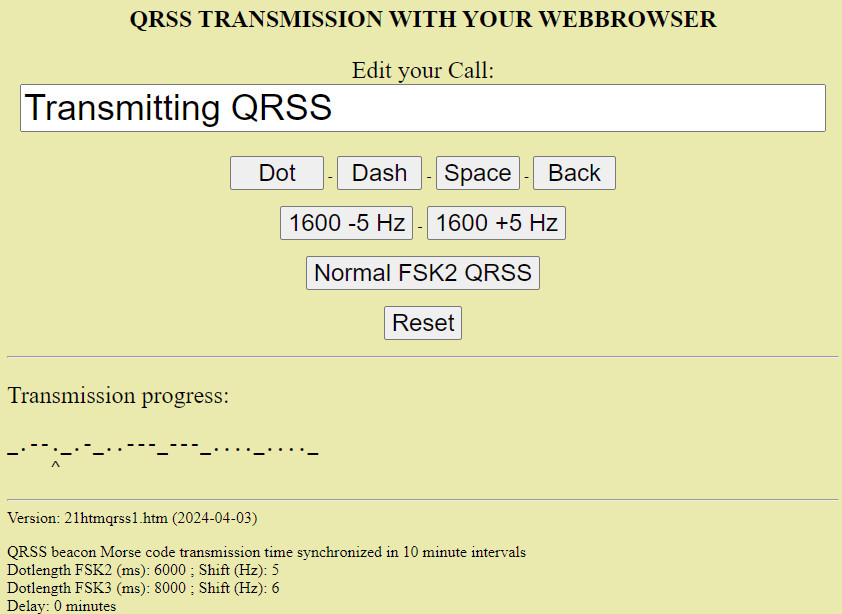
Screenshot of the web page for generating a QRSS signal
Try here how it works
Download the HTML script 21htmlsource.zip here
How does it work?
Very simple. Download the script, unzip it and open it with your web browser. Enter your call in Morse code in the "Edit your Call" window and press the "Start QRSS" button. What you see is that your call is replaced by a message "Waiting for synchronization". Nothing else happens... The QRSS transmission is synchronized in 10 minute intervals and will only start at a multiple of 10 minutes (0, 10, 20, 30, 40, 50 minutes of a full hour). So don't think it won't work, you just have to wait a few minutes. A space is a low tone (1600 Hz) and a dot or dash is a slightly higher tone (1605 Hz). When the transmission has started, you can see at the bottom under "Morse" which dot or dash is being sent. A space is replaced by an underscore. An extra space is also added at the beginning of the transmission, so that you first have a low tone and do not immediately start with a high shift.
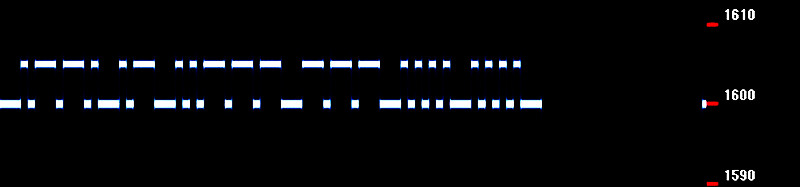
This is what the QRSS signal looks like when it is received with -Normal FSK2 QRSS- mode
How to connect the audio output to the microphone or other audio input
Do not connect the audio output of your PC, tablet PC or smartphone directly to the audio input. Connect the audio output to the audio input via a 10k series resistor. And a resistor Rx in parallel with this audio input to reduce the level to the desired level. You can also additionally use the media volume setting to change the level.
Adjust the level so that your power is not more than 1 watt!!! QRSS transmitters work with very low powers. With high powers you can send or disrupt the receivers of QRSS signals. And it's a continuous signal. Your transmitter is not designed to work continuously at full power, but for SSB and CW, so shorter peak powers!

You can also edit the script with an ASCII text editor
Modification of the script
With an ASCII text editor such as Notepad or my favorite Geany you can easily modify the script. The extension of the file name must of course remain ".htm", otherwise it will not be opened by your web browser. You can program your call in Morse so that you don't have to fill it in again and again. And you can optionally enter a delay to start the transmission a minute later, for example. This must be an integer, so for example 1, 2 or 3.
ALTERNATIVE QRSS MODES
Radovan, OK1FCX uses this mode very often.
This alternative QRSS mode has not two, but three shifts. A space is again a low tone (1600 Hz) and the dot a slightly less high tone (1603 Hz). But the dash has now become a dot with a third highest tone (1606 Hz). The benefit will be obvious. The transmission is shorter. Was the length of a dash 3 dots, now it's only 1 dot! Another advantage is that the dot and dash have two different pitches and are therefore easier to distinguish from each other. Optionally, you can change the length of a dot from 6000 ms to 8000 ms for even better readability. You can change the script again with an ASCII text editor as described earlier.
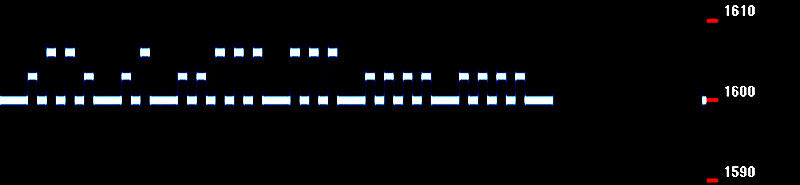
This is what the QRSS signal looks like when it is received with -Alternative FSK3 QRSS- mode
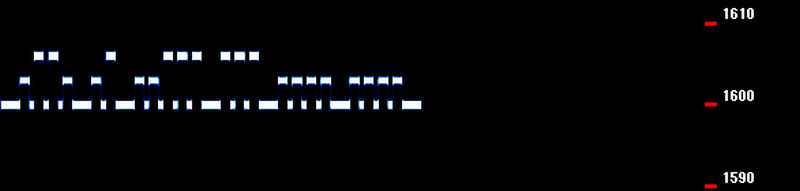
This is what the QRSS signal looks like when it is received with -Short FSK3 QRSS- mode
The spaces between the dots are shorter. This mode is also used quite often

And of course there is also the good old -On-Off QRSS- mode!
Index PA2OHH