|
|
 |
|
|
|
|
a Boolean operation that compares two Rational objects for equality |
|
|
|
|
|
|
|
|
an output operation that displays the value of a Rational object in the form numerator/denominator |
|
|
|
|
|
|
|
|
Include any additional operations that you think would be useful for a rational number class. |
|
|
|
|
|
|
|
|
2. A complex (imaginary) number has the form a + bi, where i is the square root of -1. Here, a is called the real part and b is called the imaginary part. Alternatively, a + bi can be expressed as the ordered pair of real numbers (a, b). |
|
|
|
|
|
|
|
|
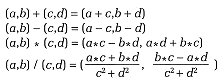
Arithmetic operations on two complex numbers (a, b) and (c, d) are as follows: |
|
|
|
|
|
|
|
|
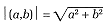
Also, the absolute value (or magnitude) of a complex number is defined as |
|
|
|
|
|
|
|
|
Design, implement, and test a complex number class that represents the real and imaginary parts as double precision values (data type double) and provides at least the following operations: |
|
|
|
|
|
|
|
|
constructors for explicit as well as default initialization. The default initial value should be (0.0, 0.0). |
|
|
|
|
|
|
|
|
arithmetic operations that add, subtract, multiply, and divide two complex numbers. These should be implemented as value-returning functions, each returning a class object. |
|
|
|
|
|
|
|
|
a complex absolute value operation |
|
|
|
|
|
|
|
|
two observer operations, RealPart and ImagPart, that return the real and imaginary parts of a complex number |
|
|
|
|
|
|
|
|
3. Design, implement, and test a countdown timer class named Timer. This class mimics a real-world timer by counting off seconds, starting from an initial value. When the timer reaches zero, it beeps (by sending the alert character, \a, to the standard output device). Some appropriate operations might be the following: |
|
|
|
|
|
|
|
|
Create a timer, initializing it to a specified number of seconds. |
|
|
|
|
|
|
|
|
Start the timer. |
|
|
|
|
|
|
|
|
Reset the timer to some value. |
|
|
|
|
|
|
|
|
When the Start operation is invoked, it should repeatedly decrement and output the current value of the timer approximately every second. To delay the program for one second, use a For loop whose body does absolutely nothing; that is, its body is the null statement. Experiment with the number of loop iterations to achieve as close to a one-second delay as you can. |
|
|
|
|
|
|
|
|
If your C++ standard library provides functions to clear the screen and to position the cursor anywhere on the screen, you might want to do the following. Begin by clearing the screen. Then, always display the timer value at the same position in the center of the screen. Each output should overwrite the previous value displayed, just like a real-world timer. |
|
|
|
|
|