|
|
|
|
|
|
|
Compiling and Linking a Multifile Program |
|
|
|
|
|
|
|
|
Now that we have created a specification file and an implementation file for our TimeType class, how do we (or any other programmer) make use of these files in our programs? Let's begin by looking at the notion of separate compilation of source code files. |
|
|
|
|
|
|
|
|
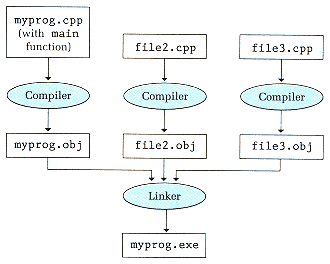
We have referred several times in earlier chapters to the concept of a multifile programa program divided up into several files containing source code. In C++, it is possible to compile each of these files separately. The compiler translates each source code file into an object code file. Figure 15-6 shows a multifile program consisting of the source code files myprog.cpp, file2.cpp, and file3.cpp. We can compile each of these files independently, yielding object code files myprog.obj, file2.obj, and file3.obj. Although each .obj file contains machine language code, it is not yet in executable form. The system's linker program brings the object code together to form an executable program file. (In Figure 15-6, we use the file name suffixes .cpp, .obj, and .exe. Your C++ system may use different file name conventions.) |
|
|
|
|
|
|
|
|
Files such as file2.cpp and file3.cpp typically contain function definitions for functions that are called by the code in myprog.cpp. An important benefit of separate compilation is that modifying the code in just one file requires recompiling only that file. The new .obj file is then relinked with the other existing .obj files. Of course, if a modification to one file affects the code in another filefor example, changing a function's interface by altering the number or data types of the function parametersthen the affected files also need to be modified and recompiled. |
|
|
|
|
|
|
|
|
Figure 15-6
Separate Compilation and Linking |
|
|
|
|
|