|
|
|
|
|
|
|
// Postcondition:
// One input line has been read through \n
// && stuName contains at most 10 of the input characters
// encountered before \n
// && length == length of stuName
{
cin.get(stuName, 11); // Read at most 10 characters
cin.ignore(100, \n);
length = strlen(stuName);
} |
|
|
|
|
|
|
|
|
We can call GetAName using a component of student as follows. |
|
|
|
|
|
|
|
|
GetAName(student[2], nameLength); |
|
|
|
|
|
|
|
|
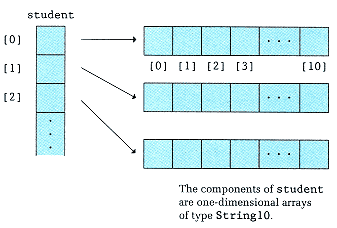
Row 2 of student is passed to GetAName, which treats it like any other one-dimensional array of type String10 (see Figure 13-8). It makes sense to pass the row as a parameter because both it and the formal parameter are of the same named type, String10. |
|
|
|
|
|
|
|
|
Declaring student as a one-dimensional array of strings is clearer than declaring it directly as a two-dimensional array. Whenever possible, we like to treat a string as a single item rather than as an array of individual characters. |
|
|
|
|
|
|
|
|
C++ does not place a limit on the number of dimensions that an array can have. We can generalize our definition of an array to cover all cases. |
|
|
|
|
|
|
|
|
Figure 13-8
A One-Dimensional Array of One-Dimensional Arrays |
|
|
|
|
|