from the expression or string written on the right to the output stream on the left.
You can use the < operator several times in a single output statement. Each occurrence appends the next data item to the output stream. For example, we can write the preceding two output statements as
cout < The answer is < 3 * num;
If num contains the value 5, both versions produce the same output:
The answer is 15
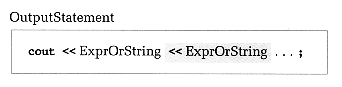
The output statement has the following form, where ExprOrString stands for either an expression of simple type or a string constant:
The following output statements yield the output shown. These examples assume that the variable i contains the value 2, and j contains 6.
Statement
What Is Printed (; means blank)
cout < i;
2
cout < i = < i ;
i ; = ; 2
cout < Sum = < i + j;
Sum ; = ; 8
cout < ERROR MESSAGE;
ERROR ; MESSAGE
cout < Error= < i;
Error=2
cout < j: < j < i: < i;
j : 6i : 2
cout < j: < j < < i: < i;
j : 6;i : 2
An output statement prints string constants exactly as they appear within quotes. To let the computer know that you want to print a string constantnot a named constant or variableyou must use double quotes to enclose the string. If you don't put quotes around a string, you'll probably get an error message (like UNDECLARED IDENTIFIER) from the C++ compiler. If you want to print a string that includes a double quote, you must type a backslash (\) character and a double quote, with no space between them, in the string. For example, to print the string
 ; means blank)