|
|
|
|
|
|
|
Errors can be syntactic or semantic. The compiler finds syntactic errors. For example, the compiler warns you when reserved words are misspelled, identifiers are undeclared, semicolons are missing, and operand types are mismatched. But it won't find all of your typing errors. If you type > instead of <, you won't get an error message. It's up to you to design test data and carefully check the code to detect semantic errors. |
|
|
|
|
|
|
|
|
Semantic errors (also called logic errors) are mistakes that give you the wrong answer. They are more difficult to locate than syntactic errors and usually surface when a program is executing. C++ detects only the most obvious semantic errorsthose that result in an invalid operation (dividing by zero, for example). Although semantic errors sometimes are caused by typing errors, they are more often a product of faulty design. The mistake we found in the algorithm walk-through for the lumberyard problem is a typical semantic error. |
|
|
|
|
|
|
|
|
By walking through the algorithm and the code, tracing the execution of the program, and developing a thorough test strategy, you should be able to avoid, or at least quickly locate, semantic errors in your programs. |
|
|
|
|
|
|
|
|
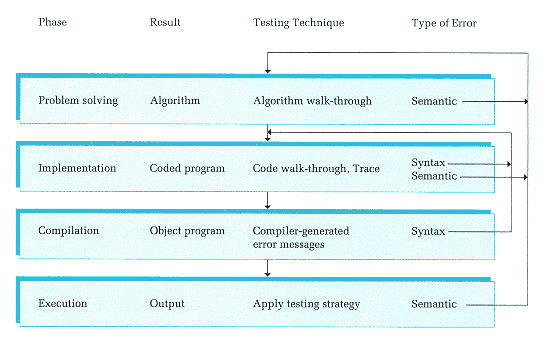
Figure 5-9 illustrates the testing process we've been discussing. The figure shows where syntax and semantic errors occur and in which phase they can be corrected. |
|
|
|
|
|
|
|
|
Figure 5-9
Testing Process |
|
|
|
|
|