|
|
|
|
|
|
|
data from the file and then, presumably, to perform some computations. It concludes by executing the statement |
|
|
|
|
|
|
|
|
With this statement, the main function returns control to the computer's operating system. Recall that the function value returned by main is known as the exit status. The value 0 signifies normal completion of the program. Any other value (typically 1, 2, 3, ) means that something went wrong. |
|
|
|
|
|
|
|
|
Let's trace through the program again, assuming we weren't able to open the input file. Upon return from the open function, the stream inFile is in the fail state. In the If statement, the value of the expression ! inFile is nonzero (TRUE). Thus, the then-clause is executed. The program prints an error message to the user and then terminates, returning an exit status of 1 to inform the operating system of an abnormal termination of the program. (Our choice of the value 1 for the exit status is purely arbitrary. System programmers sometimes use several different values in a program to signal different reasons for program termination. But most people just use the value 1.) |
|
|
|
|
|
|
|
|
Whenever you open a data file for input, be sure to test the stream state before proceeding. If you forget to, and the computer cannot open the file, your program quietly continues executing and ignores any input operations on the file. |
|
|
|
|
|
|
|
|
Problem-solving case study An Electronic Activity Director |
|
|
|
|
|
|
|
|
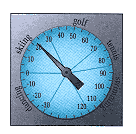
Problem: You've taken a job at a year-round resort where the owner has just installed a computerized sign. She wants you to program the sign to show the current temperature and a recommended activity. Your program should read the temperature and print out the activity appropriate for that temperature using the following guidelines: |
|
|
|
|
|