|
|
|
|
|
|
|
Now that we've seen how to write logical expressions, let's use them to alter the normal flow of control in a program. The If statement is the fundamental control structure that allows branches in the flow of control. With it, we can ask a question and choose a course of action: If a certain condition exists, then perform one action, else perform a different action. |
|
|
|
|
|
|
|
|
The computer actually performs just one of the two actions under any given set of circumstances. Yet we have to write both actions into the program. Why? Because, depending on the circumstances, the computer can choose to execute either of them. The If statement gives us a way of including both actions in a program and gives the computer a way of deciding which action to take. |
|
|
|
|
|
|
|
|
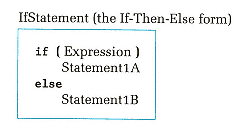
In C++, the If statement comes in two forms: the If-Then-Else form and the If-Then form. Let's look first at the If-Then-Else. Here is its syntax template: |
|
|
|
|
|
|
|
|
The expression in parentheses can be of any simple data type. Almost without exception, this will be a logical (Boolean) expression. If the value of the expression is nonzero (TRUE), the computer executes Statement1A. If the value of the expression is zero (FALSE), Statement1B is executed. Statement1A often is called the then-clause; Statement1B, the else-clause. Figure 5-3 illustrates the flow of control of the If-Then-Else. In the figure, Statement2 is the next statement in the program after the entire If statement. |
|
|
|
|
|
|
|
|
Notice that a C++ If statement uses the reserved words if and else but does not include the word then. Still, we use the term If-Then-Else because it corresponds to how we say things in English: If something is true, then do this, else do that. |
|
|
|
|
|
|
|
|
The code fragment below shows how to write an If statement in a program. Observe the indentation of the then-clause and the else-clause, which makes the statement easier to read. And notice the placement of the statement following the If statement. |
|
|
|
|
|