|
|
|
|
|
|
|
When the computer executes this statement, it inputs the next number you type on the keyboard (425, for example) and stores it into the variable cost. |
|
|
|
|
|
|
|
|
The extraction operator >> takes two operands. Its left-hand operand is a stream expression (in the simplest case, just the variable cin). Its right-hand operand is a variable of a simple type (char, int, float, and so forth). |
|
|
|
|
|
|
|
|
You can use the >> operator several times in a single input statement. Each occurrence extracts (inputs) the next data item from the input stream. For example, there is no difference between the statement |
|
|
|
|
|
|
|
|
and the pair of statements |
|
|
|
|
|
|
|
|
cin >> length;
cin >> width; |
|
|
|
|
|
|
|
|
Using a sequence of extractions in one statement is a convenience for the programmer. |
|
|
|
|
|
|
|
|
When you are new to C++, you may get the extraction operator (>>) and the insertion operator (<) reversed. Here is an easy way to remember which one is which: Always begin the statement with either cin or cout, and use the operator that points in the direction in which the data is going. The statement |
|
|
|
|
|
|
|
|
sends data from the variable someInt to the output stream. The statement |
|
|
|
|
|
|
|
|
sends data from the input stream to the variable someInt. |
|
|
|
|
|
|
|
|
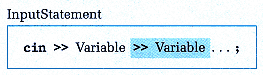
Here's the syntax template for an input statement: |
|
|
|
|
|
|
|
|
Unlike the items specified in an output statement, which can be constants, variables, or complicated expressions, the items specified in an input statement can only be variable names. Why? Because an input statement indicates where input data values should be stored. Only variable names refer to memory locations where we can store values while a program is running. |
|
|
|
|
|