
| PSK31 | ||
| MixW2 | by Nick, UT2UZ |
Psk31, RTTY,
PACKET, SSTV, Olivia versione Demo (completa) |
|
(DM 780) |
by Simon HB9DRV |
PSK31, RTTY, Olivia ecc... ottimo Free |
| Multi Mode | by Chris, N3JLY (Macintosh) |
|
| Psk31sbw | by Peter Martinez, G3PLX. | Detailed Tutorials |
| MultiPSK | by F6CTE |
|
| DigiPan | by Skip, KH6TY | |
| Zakanaka | by Bob, K4CY |
|
| WinPSK | by Moe, AE4JY |
|
| RTTY | ||
| MMTTY | JE3HHT - Makoto Mori | Ottimo |
| RCKRTTY | by Walter, DL4RCK |
|
| TrueTTY | by Sergei, UA9OSV | |
| WinWarbler | by Dave, AA6YQ |
|
| LOG e CLUSTER | ||
| Ham Radio Deluxe v. 3.2 | by Simon Brown HB9DRV |
Ottimo Free con PSK31 e Mapper (con registrazione gratuita) |
| Wlog2000 | Ottimo Shareware | |
| N1MM Logger | by Tom, N1MM |
|
| EasyLog 5 |
Demo 30 gg. con PACKET, CAT per 2 radio e PSK31 (con registrazione) |
|
| DX4WIN | by Steve, NR4M |
|
| WriteLog | by Ron, K5DJ |
|
| RX CLUS 8.3 | by Robert Calmas - HB9BZA | Ottimo programma (free) per visualizzare vari cluster in Italiano per Windows 95/98/ME+NT4/2000/XP |
| PACKET | ||
| AGW Packet Engine | by SW2AGW | Demo 30 gg. |
| Cluster Master Management Program | ||
|
Qui sotto sono elencati alcuni
circuiti interfaccia da utilizzare per lavorare in digitale.
Piedinature porte apparati
|
||||
|
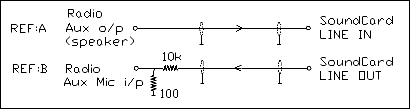
The simplest and quickest computer to radio interface is to connect the Line Output from the Sound Card to the transceiver audio input with a 100:1 voltage divider to reduce the voltage output, and the Sound Card Line Input to the audio output of the radio. You can use the VOX to switch from Receive to Transmit. To setup this arrangement, adjust the sound card output level using the computer 'mixer' control until maximum transmit power is reached, and the ALC is just starting to read. Then tune to a strong carrier and adjust the soundcard input gain until the red line goes away as observed on the spectrum display. waterfall (indicator) This procedure is covered in great detail in the PSK31 Help files under "setting up the sound card". |
|
The
circuit below shows the method I used which isolates the
Sound Card Line In and Line Out from the Radio using a couple of Radio
Shack transformers, and a 2N2222 transistor to switch the PTT radio line
triggered by the RTS line of the computer Com Port. All
audio levels are equalized when running either the computer, the SSTV
program or PSK31. To adjust this circuit, tune to a strong carrier
and adjust the Rig Volume until the red overload lines
disappear. At this point simply tweak RV1 to give the
required output power from the transmitter. |

Qui sotto sono riportati alcuni schemi per comandare il PTT della Radio.
Questo con un transistor 2N2222 o BC 278 sistema classico.

Questo circuito serve per comandare il PTT, e tramite
il Fotoaccoppiatore 4N25, 4N29, ECG 3084 o equivalenti si può
isolare completamente il Computer dalla Radio.

|
The
calling frequencies that have been decided upon for the time being are:
|
|