1. Introduction
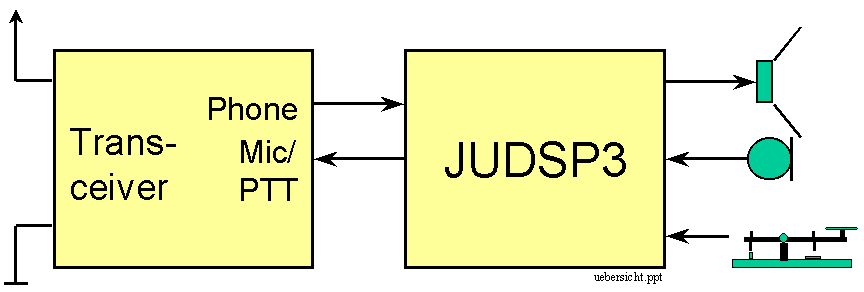
JUDSP3 is an add-on-solution for ham radio stations for transmit and receive. It is connected simply between transceiver and speaker, microphone and key:
JUDSP3 is available with 1 or 2 MByte memory. It must be installed according to chap. 1.4.
1.1 Software specifications
DSP-device for transceiver to support transmit and receive operation with 1 MB [2MB] memory:
|
J |
Narrowband filter for HF: |
|
J |
Narrowband filter for VHF: |
|
J |
Broadband filter: |
|
J |
Automatic notch filter |
|
J |
Automatic noise suppression (Denoise) |
|
J |
High Speed Meteor Scatter (HSMS) |
|
J |
55 sec [110 sec] voice-recorder for CQ-loops, SSB meteor scatter and beacon-transmissions. |
|
J |
Clipper with nearly distortion-free processing of voice for optimized transmitter driving. |
1.2 Hardware specifications
Powersupply: max. 500 mA @ 10-14V=
Input level display with exact 3dB per unit.
Microphone and speaker are bypassed, when power is switched off.
Double processor unit
DSP-CPU (TMS320C50) with 60 MHz clock for digital signal processing
RISC-CPU (16F84) with 4 MHz clock for operation control
Memory:
64 kByte 0-wait-state SRAM for program and data
128 kByte EPROM for DSP-software
1 MByte (option 2 MByte) SRAM
EEPROM for saving of configuration-parameters.
1.3 Handling
1.3.1 Display
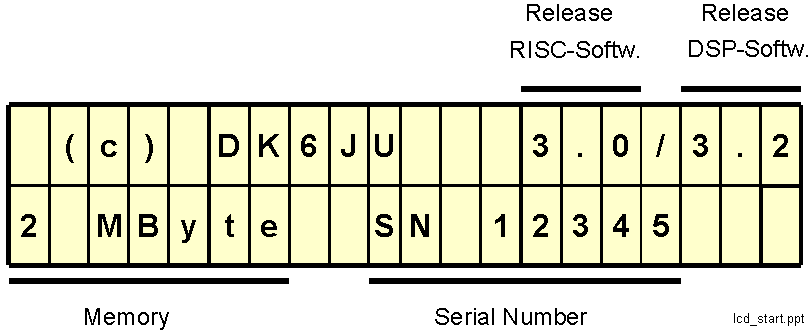
A LCD display with 2 lines with 20 characters each is used to show the operating conditions and settings. After switching power on the display shows for approx. 1 sec the following message:
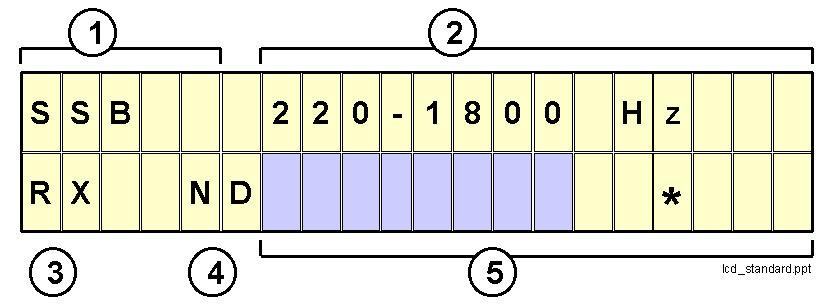
After that the selected function is displayed. Most functions use the following display scheme:
|
� |
selected function (SSB-filter) |
|
‚ |
setting of important parameters (bandwidth) |
|
ƒ |
transceiver status: transmit (TX) or receive (RX) |
|
„ |
N= automatic notchfilter is ON |
|
|
D= automatic noise suppression (Denoise) is ON |
|
… |
level display: the level display is a dark bargraph, growing from left to right with increasing input level. The bargraph shows the smoothed input level. Maximum input level is reached, if the bargraph reaches the rightmost position on the display. |
1.3.2 Operating panel
HINT: most control functions can be evaluated, while JUDSP3 is not connected to a transceiver but only to a powersupply. JUDSP3 is operated by 3 knobs and 14 push buttons.

|
MIC: |
Adjust microphone gain. Only used for transmit-functions (clipper, voice recorder) to control input level. |
|
IN : |
Control input level from receiver. Only used for receive-functions. |
|
AF : |
AF volume |
|
MODE : |
Select function (e.g.: CW-Filter, SSB-Filter, Clipper ...) |
|
SET : |
Choose a parameter to change (e.g.: bandwidth, center frequency ...). The actual change of the parameter is done with the "direction"-keys ( < << > ...) |
|
N |
On/Off automatic notch |
|
D |
On/Off automatic denoise |
The meaning of the "direction"-keys ( >> > ...)is different for
- play/playback-operation
- change of settings
|
direction |
record/playback operation |
change of settings |
|
|< |
go to beginning of next record |
decrease value very much |
|
<< |
fast playback backward |
decrease value |
|
< |
playback backward |
decrease value a little |
|
STOP |
STOP |
|
|
> |
playback |
increase value a little |
|
>> |
fast playback |
increase value |
|
>| |
goto to end of record |
increase value very much |
|
REC |
start recording |
save actual settings permanently |
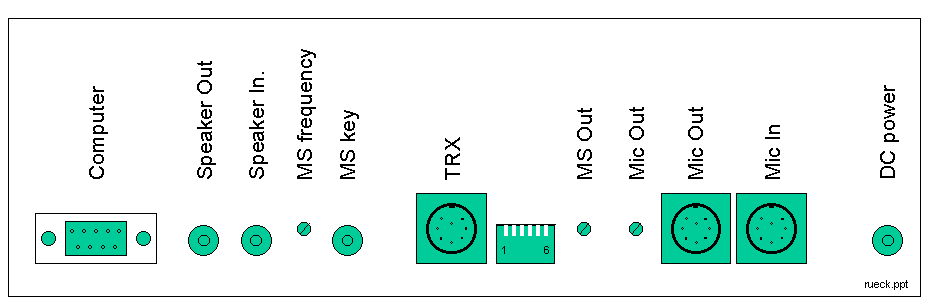
At the rear panel are the connectors and rarely used trim pots.
|
1 |
2 |
3 |
4 |
5 |
6 |
|
|
é |
ê |
x |
x |
x |
x |
"MS key": keying with computer |
|
ê |
é |
x |
x |
x |
x |
"MS key": keying with on/off key |
|
x |
x |
é |
ê |
x |
x |
AF-input (for receive) is "Line In" (TRX) |
|
x |
x |
ê |
é |
x |
x |
AF-input (for receive) is "Speaker In" |
|
x |
x |
x |
x |
é |
ê |
AF-output (for transmit) is "Mic Out" |
|
x |
x |
x |
x |
ê |
é |
AF-output (for transmit) is "Line Out" (TRX) |
1.4 Installation
The installation of JUDSP3 should be done in steps. After every step you should check for propper operation. A detailed description of all possible connections can be found in appendix A1.
Power supply
The power supply for JUDSP3 is 12V DC (max. 14V). Connector is a RCA jack with plus at the center pin.
Attention: the connection must be fused (max. 1A).
After POWER ON the LCD shows the startup display (chap. 1.3.1) for approx. 1 sec. Then the display changes to the selected function. You can now check out all keys (but not the REC-key, because important settings might be lost).
Speaker
Connect a speaker (at least 8 Ohm) with an RCA-jack to "Speaker Out" of JUDSP3. Connect "Speaker In" to the speaker- or headphone-connector of your transceiver. With power switched off you should hear the AF-output of your tranceiver in the speaker, because JUDSP3 directly connects "Speaker In" to "Speaker Out" (with a relay!) if no power is applied.
DIP-switches at the rear panel: switch 3
ê ,switch 4 éTurn AF completely counterclockwise. Switch JUDSP3 on and select SSB with MODE keys. You should see a display like this:
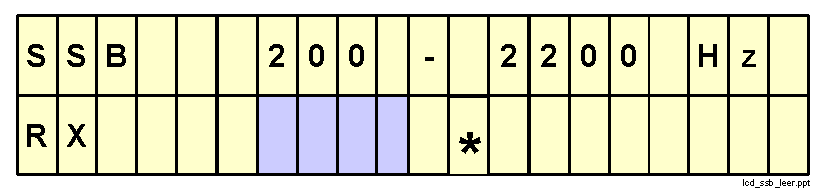
Adjust IN-control so that the bargraph shows nearly maximum input level (see chap.1.3.1). Now turn AF clockwise for comfortable listening to the signal.
The input level of the DSP-processor in JUDSP3 is determined by two controls: the volume control of the transceiver and the IN control of JUDSP3. On principle you should use the following setting: adjust the volume control of the transceiver as you did before without JUDSP3. With the IN control of JUDSP3 you adjust the right input level.
Now you can try all receive-functions of JUDSP3 (see chap. 2).
Microphone
The microphone must be connected to the "Mic In" jack. The "Mic Out" connector must be connected to the microphone input of the transceiver. "Mic In" is directly connected to "Mic Out" when power is switched off.
The connectors of JUDSP3 are DIN-8 jacks on the rear panel. Attention: the DIN-8 jacks are available in two very similar types:
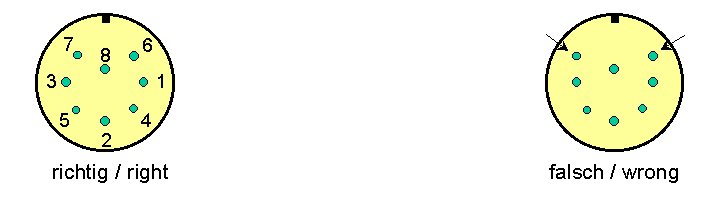
The picture shows the view on the solderside of the plug (front side of jack).
Pinning of "Mic In" and "Mic Out":
1 Microphone
2 PTT
3 Down-button of microphone (directly connected from MicIn to Mic Out)
4 Up-button of microphone (directly connected from MicIn to Mic Out)
5 other (directly connected from Mic In to Mic Out)
6 other (directly connected from Mic In to Mic Out)
7 microphone ground
8 PTT ground
DIP-switches at the rear: switch 5
é , switch 6 êTurn MIC completely counterclockwise. Select CLIPPER with MODE keys. With the SET keys and the "direction"-keys select setting Tune (not Tune
Ÿ Ÿ Ÿ ).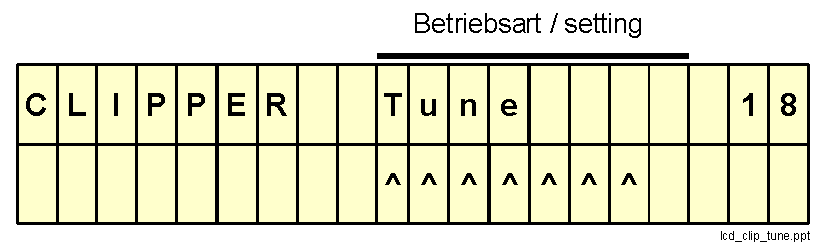
Pressing the PTT now gives the following result:
|
-- |
The transmitter is modulated with a constant tone. This tone has the same amplitude as the clipped voice. So the output level can be adjusted with "Mic Out" at the rear panel to a optimal level for the transmitter. |
|
Select setting Clip with SET and the "direction"-keys. Press the PTT and talk into the microphone while adjusting the input level with the MIC-control in a way, that during peak input the bargraph reaches the right end of the display. Under this condition the peak display (
) just disappears. The bargraph may never disappear during peak levels, as this is an overload condition giving severe distortions.JUDSP3 is now optimal tuned for transmit operation.
Morsekey
You only have to connect a key, if you want to use the build in Af injection keyer for high speed meteor scatter.
Selection of key-type:
switch 1
ê , switch 2 é : for an on/off keyer (ETM9 ...)The keyer is always connected to the RCA jack "MS key", independent of the type of keyer.
The frequency of the AF-signal can be adjusted with the trim pot "MS frequency". Recommended frequency is 1100Hz (see chap 2.5.4). The level can be controlled with "MS Out". The signal is feed via "Mic Out" to the transceiver.
Headphone see Appendix A1.4