Alarm clock features:
- WAKER3 MAY BE CLOSED FROM THE DESKTOP BY CLICKIN THE ICON IN THE LOWSIDE
TASKBAR
WITH THE RIGHT MOUSE BUTTON AND OPENED AGAIN BY CLICKING WITH THE LEFT BUTTON!
- Analog local time. Local time or UT as digital.
- Weekday and number visible
-
Moon phase, altitude and direction always visible
- Time checking and adjusting by clicking the clock.
- Alarms daily, weekdays, working days, weekends, certain date, once or
every year
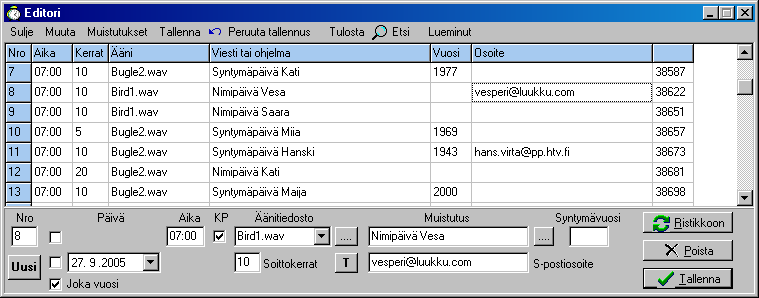
- Birthdays, wedding days, meetings etc. as
many as you like,
- You will not forget the important days
any more.
- Sets Waker shortcut to Startup folder, so it will be always ready!
- Possibilty to add an email address to the alert and send a congratulatory
message.
- Start a program, music or video with the alarm
- Alarm file backup on the Settings form
Alarm List with all alarms in a
short form (avoid uppercase letters and use short words). The
Alarm List may
be opened also by clicking the Moon. Weekly list by clicking the weekday,
Daily list by clicking the date.
Maestro astronomical program. Choose <Identify> and give the approximate
height and compass direction of an unknown body. The program will announce the
name of that star or planet!
Alma reports about the astronomical
happenings today and tomorrow. Now also about the visibility of big planets and
the Moon. Their minimum azimuth, direction and transit may be chosen. F.ex. if
you have open vieuw to the West, the values could be az 200, hc (height) 10 and
transit 20 (o'clock). Then if the values of a planet are 200° - 360°, its height
at least 10° and the transit between 20 - 24 o'clock, its values are shown in
the 'Today' field. If the desired direction is North the setting could be
270-90 or transit at midnight the setting 21-3 may be used.
Meteor3 for simple file backup
- click open the wanted From Directory
- select the To Drive or Partition
- check 'Include Subfolders'
- click <Copy>
The program copies all new or edited files.
Avain actual courses of 36 values with a counter
Egg Clock for short time remainders.
Now new EggClock, with which
you may f.ex. follow the total length of internet connections from day to day.
Filexx, file handling program
First group:
- search a string in files
- search a string in file names
- replace a string in files
- replace a string in file names
- file names lowercase
- first letter uppercase
- files modified after a given date
Second group:
- file name group
- copy selected files to another folder
- delete selected files
- print the file names in a directory
- count the line number in a file (according to a string)
- show the certain line of a file (according to the line number)
In the new version the searches and replacements also in all subfolders, of
the first group.
Filexx is a rather complicated program, so please test each function
beforehand with some temp directories and test files!
No guarantee may be given for the results.
Conversions useful f.ex. for navigators
Update offers a download link for the new versions
Update Waker3.zip contains also the new WakUpd.exe
file, which helps making the update process easier in te future.
Download first-time Waker3 setup v. 3.3.0.1 [850 kb] [07/12/2011].
Official installation under C:\Program
Files\ and used generally as limited user.
Loading of the waker3stp.zip
MBnet
HTVnet
QSLnet
Two new forms of portable installations:
1 - wakerportable
Installation anywhere except under the
C:\Program Files\.
Default installation
C:\Programs\Waker\
Loading of the wakerportable.zip
MBnet
HTVnet
QSLnet
2 - WakerPack
Installation anywhere except under the
C:\Program Files\. The package is extracted to
an empty folder. This is very suitable for a USB stick installation. The package
contains Waker3, Avain, Filexx and Meteor3 programs. A shortcut is drawn from
each one to the Desktop or to the root folder of a memory stick.
'wakerportable.exe' is also in this package for the first-time complete
installation, which means that Waker3 starts when the Windows is starting.
Loading of the WakerPack.zip
MBnet
HTVnet
QSLnet
Waker programs may be converted to portable. Then all help files
are in the same directory as the program itself. Settings ->
<Make Program Portable> . Then it may also be installed in a memory stick
From the program a Shortcut is dragged to the memory stick root
directory for start-up.
New Maestro setting: PC Time/ Other Time. 'PC Time' means that the computer is
set to the actual time zone time. 'Other Time' means you are selecting a foreign
place and want its time to be the local time.
Another new setting in Maestro:
Delta. In the program there are right values until the year 2011, for which
there is an estimated value. More exact time may be given instead [3.1.6].
Only Waker3.zip
[400 kb]
There are no sounds here, so you will get them with the installations!
MBnet
HTVnet
QSLnet
Date or Time in erroneous format in Windows 7
There have
been cases where the date or time is not in the correct form. These have been
repaired by checking the settings of the system:
Control Panel -> Clock, Language and Region -> Region and Language where on the
Numbers page the Short Date and Short Time may be correct. If this does not help
pressing the button <Reset> may repair the fault.