February, 6th, 2016 --> Friday, January 5th, 2018
Tuesday, April 2nd, 2024 <-- Tuesday, March 19th, 2024
@ Sunday, April 7th, 2024 <-- Tuesday, March 26th, 2024
A1A Breaker works well on Windows XP, and the later OS's.
 p
pApplication Software for Morse Code
Listening and Sending Practice
Go next. Return to Index.
A1A_Breaker 242.zip Ver. 0.24.2
October 25th, 2023
| 1. The generated Morse code is almost free of key-clicks in sound. | |
| 2. Adjustable dot, dash, spacing ratios | |
| 3. Code Speed: 20 to 250 cpm (characters per minute) | |
| 4. Realtime and Accurate Speed Display: Every time each character sounds, the measurement of the code speed is updated. |
|
| 5. You can practise formal radio telegram message handlings. Click on the following main menu items: Text --> Telegram Text Get 'Words' Radio Button checked, and click on "OK" button, so two or three formal radio telegrams will be generated in a text form and displayed at the left side of the Windows pane. And then you have only to click on "Run" button to start receiving practice. SampleRadiogram1.wav <-- |
|
| 6. A1A Breaker is useful for HST(High Speed Telegraph) enthusiasts. A successive bursts of word-codes can be put out at random intervals. This function is controllable on a text mode with ease. SampleHST1.wav <-- 158cpm (=47wpm(paris)) 1111Hz sinusoidal waveform SampleHST2.wav <-- 222cpm (=67wpm(paris)) 1111Hz square waveform SampleHST3.wav <-- 250cpm (=75wpm(paris)) 1500Hz sinusoidal waveform Sample Size=16-bit Sample Rate=44100Hz |
|
| 7. Rapid generation of a sound-wave file: A variety of pcm-settings are available. For example, sample rate, sample size, channel, hard or soft keying sound waveform, and so on. |
|
| 8. Coherent Sound Mode has been implemented in full. |
Tuesday, November 15th, 2011
February, 6th, 2016 --> Friday, January 5th, 2018
Tuesday, April 2nd, 2024 <-- Tuesday, March 19th, 2024
@ Sunday, April 7th, 2024 <-- Tuesday, March 26th, 2024
A1A Breaker works well on Windows XP, and the later OS's.
p
| --- A1A Breaker Setup --- |
| Let's get started by downloading and installing the software product, which
is done from the linked web-site above. |
| [Downloads] |
| Click a link of the underlined A1A Breaker.zip, you will be redirected
to a web-site of Vector. The Vector is a well-known and reliable download-repository in Japan. You need two steps to start downloading at Vector as follows: |
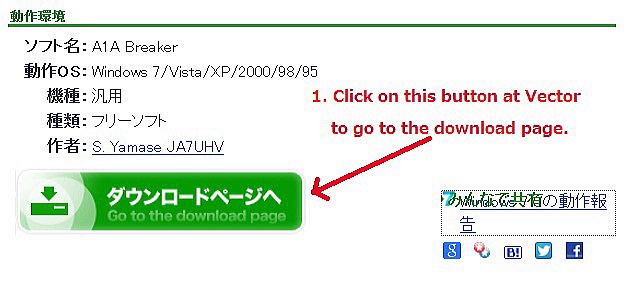
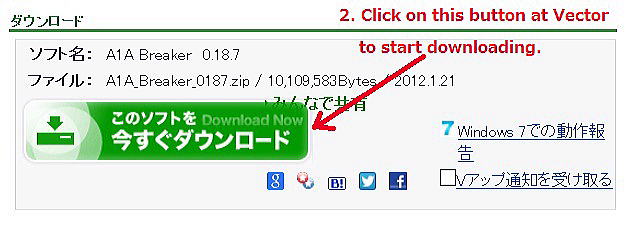
Figure 2. Step 2 at Vector.
| [Installation] |
| After unzipping, paste a folder of A1A Breaker at any place you like. On Windows 7, 8, 10 and 11, it would be better for you to save the A1A Breaker in one of the user's folders, such as "Documents", "Downloads", "Videos", or "Saved Games." Don't put your A1A Breaker into any folder under the "Program Files" or "Program Files (x86)" on Windows 7, 8, 10 and 11. Because UAC (User Account Control) might block its execution. A1ABreaker.exe does not need registry-entries. |
| [Uninstallation] |
| Remove your A1A Breaker directory and all its subdirectories from your
PC. Uninstalling is as simple as erasing a folder. |
| - |
| [To unblock to avoid security warnings on Windows 7, 8, 10 and 11] |
| Click on an icon of A1ABreaker.exe with your right-mouse, and go to --> Property --> General Tab --> Unblock --> Apply. "A1A Breaker JPN Help.chm" is a help file. Click on an icon of "A1A Breaker JPN Help.chm" with your right-mouse, and go to --> Property --> General Tab --> Unblock --> Apply. Unless unblocked, it would only display empty help pages. |

| You can choose either English or Japanese as a display language. | |
|---|---|
| [How to change a display language of A1A Breaker.] |
|
| (1) | Execute A1ABreaker.exe by double-clicking on the icon with your left-mouse.
At the very first execution, a new file of A1ABreaker.conf is automatically generated in a folder where A1ABreaker.exe exists. |
| (2) | Close the A1ABreaker.exe just after the execution. Otherwise, the following change would not come into effect. |
| (3) | A1ABreaker.conf is a simple text file, and the extension is .conf. Open the A1ABreaker.conf with a simple text editor such as Notepad. |
| (4) | Find a line of Lang=J or Lang=N in the conf file. |
| (5) | Rewrite it as follows: Lang=Eng Note that this is case-sensitive. |
| (6) | Save the A1ABreaker.conf as the same name, that is, overwrite the previous
A1ABreaker.conf. Save it in ANSI character code. Do not use any Unicode character code. |
| (7) | Execute A1ABreaker.exe once again. |
| (8) | Most of the captions and messages of the A1ABreaker will be displayed in English. (Figure 3.) |

Figure 3. A1A Breaker on Windows 7, x64, U.S. Edition.
| A1A Breaker is a non-Unicode program. It uses Shift_JIS(Japanese Industrial Standards) character set. |
|---|
| [To set Pitch of Tone] |
| You can practice Morse code in two tones as well as in a single tone. Try to input two frequencies by the unit of Hertz in the "Pitch of Tone" Edit Box as follows: 880 / 440. |

| So the A1A Breaker generates the sound data of 880 Hz and 440 Hz in a sinusoidal
waveform, and then makes a linear superposition of them with the same amplitude. The A1A Breaker sounds two tones of 880 Hz and 440 Hz. This will keep you from a monotonous listening practice in a single tone. |
|---|
| [To start a practice] |
| A1A Breaker sounds Morse code one by one while reading a text in the editor
at the left side of the main form of the A1A Breaker. |
| When you press a button of Start or a key of F2, the A1A Breaker starts sounding the codes. While listening to the codes, you are expected to write down the received letters on a sheet of paper. You may type the copied letters one by one with Notepad. |
| [Unknown characters] |
| The unknown characters means all the characters that are of no use in Morse
Code. They are *, #, <, >, !, | , and so on. The A1A Breaker regards each of them as a space. For example, "Some asterisks ******** are often used in place of a password." There are eight *'s in it, which are unknown characters. So the A1A Breaker interprets the text as follows: "Some asterisks are often used in place of a password." |
| [Compression of Spaces] |
| The A1A Breaker compresses a succession of spaces into one space while
reading a text. For example, "The light emitted by a TV set makes a good stroboscope." The A1A Breaker sounds as follows: "The light emitted by a TV set makes a good stroboscope." |
| The succession of spaces between the word of "light" and the
word of "emitted" in the text has been compressed into one space. Another train of spaces between "set" and "makes" has been also compressed into one space. |
| For another example previously described, "Some asterisks ******** are often used in place of a password." "Some asterisks ane often used in place of a password." The A1A Breaker sounds as follows: "Some asterisks are often used in place of a password." The train of spaces between "asterisks" and "are" has been compressed into one space. |
| [Convenient Macros 1] |
| When the A1A Breaker finds out a <BT> in the text editor, it sounds
dah-di-di-di-dah as a double dash. Don't put any spaces between a pair of angle brackets such as < BT> or <B T> or <BT >. Because the A1A Breaker does not recognize them as a double dash of <BT>. How does the A1A Breaker interprets them? The A1A Breaker reads each of the brackets as an unknown character, and it replaces each of them with a space. As a result, the A1A Breaker sounds BT or B T each in place of a double-dash. This rule is applied to <HH>, <AR>, <KN>, <BK>, <VA>, and so on. |
| This rule is true in the following abbreviated numerals. | ||
|---|---|---|
| [Abbreviated Numerals] | ||
| <1> <2> <3> ... <8> <9> <0> |
---> ---> ---> ... ---> ---> ---> |
di-daah di-di-daah di-di-di-daah ... daah-di-dit daah-dit daah |
The daah means a long dash, which sounds twice as long as a usual dash
in time duration.
| [Convenient Macros 2] |
| When the A1A Breaker finds out a <sp1sec> in the text editor, it sounds for one second with zero amplitude, that is, it sounds none for a second. It is only the phase of the sound which advances inside of the A1A Breaker. The <sp1sec> means <space 1 second>, and it gives you a space for one second. <sp2sec> means <space 2 seconds>, and it gives you a space for two seconds. <sp3sec> means <space 3 seconds>, and it gives you no sound of three second's duration. <sp4sec> means <space 4 seconds>, and it gives you no sound for four seconds. <sp5sec> means <space 5 seconds>, and it gives you no sound for five seconds. |
| [To comment a whole line or partial line.] |
| The A1A Breaker ignores all characters between two forward slashes(//)
and the last end of the line. And it sounds none. All of the characters this application ignores is called a comment. |
| [To comment more than one line.] |
|
The A1A Breaker ignores all characters between /* and */ in a text while it sounds codes. There is a sample file of qsoOubun.txt in a folder of A1A Breaker. |
You can practice formal radio telegram handlings.
Click on the following menu items: Text -> Telegram.Text
Get 'Words Radio Button' checked. Click on OK button.


------------------------------------------------
| [Experimental Demo] |
| The A1A Breaker has already gotten a PCM sound engine inside. I am planning to add a few functions to it in the future for its user to perform some experiments on his desktop PC. |
| [Desktop Experiment] |
|
Here are some simple experiments with using the A1A Breaker and a clock
in daily use. |
| [Experimental Target] |
| To make sure that the A1A Breaker sounds a tone of 1000.1 Hz. |
| [Physical Principle of this Experiment] |
|
If two tuning forks with frequencies 1000 Hz and 1001 Hz are struck equally
soft at the same time, |
| [Preparatory Settings] |
|
1. Double-click an icon of the A1A Breaker.exe to execute. |
| [Experiment 1] ... |
| [Experiment 2] |
|
1. Input 1000 / 1001 (Hz) into the Frequency Edit Box of the A1A Breaker. |
| [Experiment 3] |
|
1. Input 1000.0 / 1000.1 (Hz) into the Frequency Edit Box of the A1A Breaker. |
|
[The results] ... |
| [Additional Home Experiment] |
| To make sure that the A1A Breaker has an ability of sounding a tone of
1000.01 Hz. 1. Input 1000.00 / 1000.01 (Hz) into the Frequency Edit Box at the upper right side of the A1A Breaker. 2. Click on a button of Start with an audio amplifier on, the A1A Breaker will start to sound the two tones. |
| [Physical Prediction] |
|
There will occur every one hundred seconds a rise and fall of sound |
--------------------------------------
-------------------------------------
Let's take a five minute break here when you get tired of code practice.
Japan Video Clips in English at a web site of the Ministry of Foreign Affairs
of Japan
I have recently found this web site in a newspaper article.
It seems to me there is not any exaggeration in the vide contents.
http://www.mofa.go.jp/index.html
-------------------------
[Note]
This software is provided by the author on an "AS IS" basis and
any express or implied warranties are disclaimed.
In no event shall the author be liable for any direct, indirect, incidental,
special, exemplary, or consequential damages
caused in any way out of the use of this software.